Farm Tax Software: Schedule F Reports, P&L & Tax Management for Ranchers
Farm tax software built for cattle ranchers who are tired of shoehorning their operation into generic accounting tools. Generate Schedule F reports, track profit and loss, auto-classify every transaction by IRS category, value your livestock inventory, and export clean reports for your accountant — all free, all in one place. No subscriptions, no spreadsheets, no April scramble.
Tax Dashboard — Current Year
YTDReady for Tax Season
Free to start
Financial Reports
PDF & CSV
Schedule F for Livestock Ranchers — Done Right
Schedule F is the tax form every US livestock producer files with their 1040. It's where you report farm income, deduct operating expenses, and calculate your net profit or loss. Get it wrong and you either overpay taxes or invite an audit. Most ranchers use spreadsheets, shoe boxes, or hand it all to a CPA in February and hope for the best.
I built Cattly's tax reporting because I got tired of digging through a year's worth of receipts every January. The system maps every sale and expense directly to the correct Schedule F line — Livestock Sales to Line 1, Feed to Line 17, Vet costs to Line 34. No guessing. No re-categorizing at tax time. Your data flows in throughout the year as you record animal sales, feed purchases, vet visits, and equipment expenses. When tax season hits, your Schedule F report is already populated. Compare this year against last year line by line, spot variances over 10%, and export everything for your accountant. It takes minutes, not weekends.
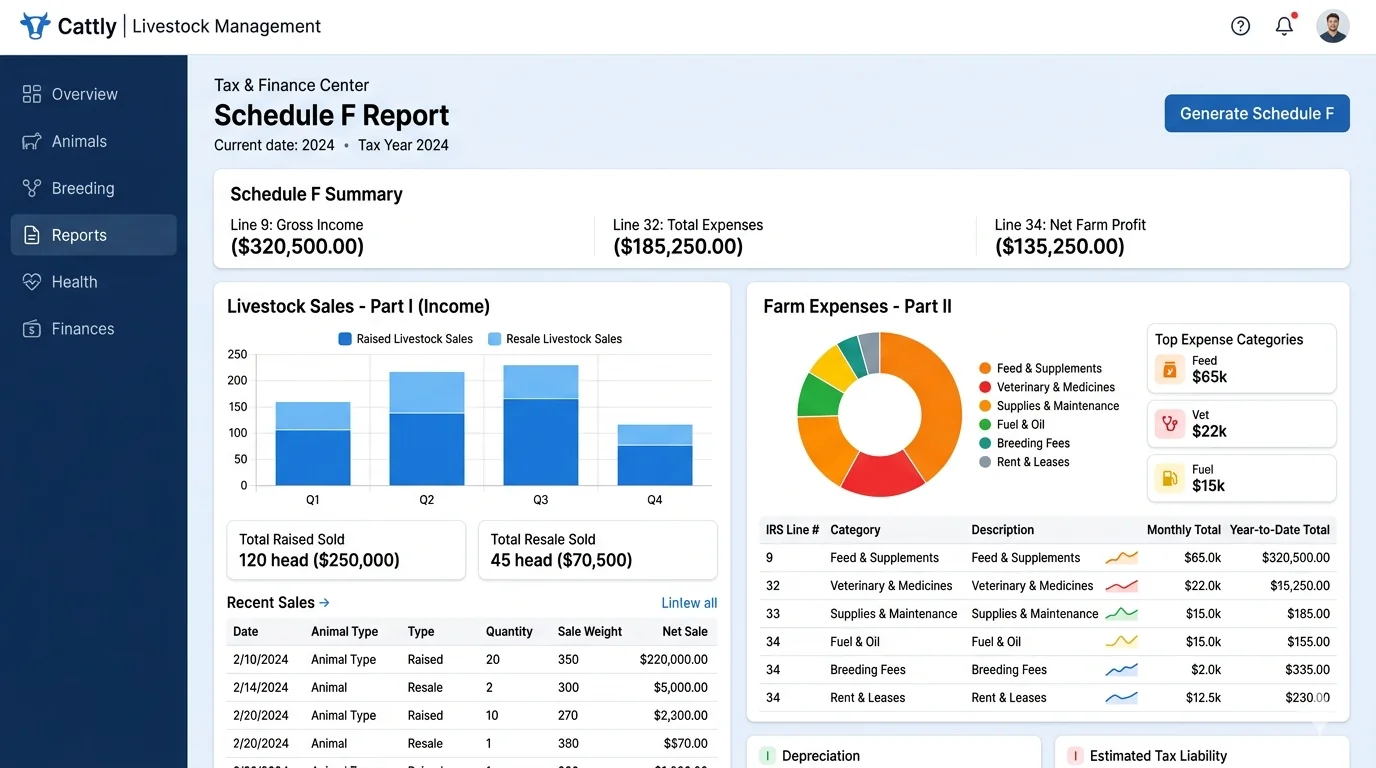
Schedule F Worksheets
Auto-generated from your live farm data. Ready for your CPA.
Schedule F Features
Auto Line Mapping
Every economic event maps to the correct Schedule F line automatically
YoY Variance Analysis
Compare current vs prior year with variance flags over 10%
Multi-Year View
See multi-year data side by side for trends and loan applications
Need to estimate your tax bill before filing?
Use our free Tax Liability Calculator based on your actual farm data
From Tax Setup to Payment Tracking
Getting your tax configuration right is the foundation. Set your fiscal year start month, choose your tax regime (Schedule F, cash basis, VAT, GST), and define your default sale and expense categories. After that, the system runs on autopilot.
Every sale and expense gets classified. Tax liability is calculated automatically. You can record payments against periods and see exactly where you stand at any point in the year. No surprises in April.
Automatically Classify Every Sale and Expense
The moment you record a sale or expense, it gets classified into the right tax category. Sell a steer? It hits Livestock Sales. Buy feed? Goes to Feed & Grain. Purchase veterinary medicine? Classified under Veterinary & Medicine. The system uses keyword rules you define, and you can set default categories so nothing falls through the cracks.
Auto-Classification
Events auto-classified based on rules you define
Manual Overrides
Re-classify any event with one click and a reason documented
Full Audit Trail
Every classification and override logged with timestamp and user
Schedule F Linked
Categories map to the correct IRS Schedule F lines automatically
Four Financial Reports. One Click.
From profit and loss to period-over-period comparisons — every report your accountant asks for, generated from your live farm data. No data entry. No export-import cycles. Just real numbers from your operation.
Profit & Loss
See your operation's bottom line for any date range. Total income vs total expenses. Net profit or loss. Broken down by category so you know exactly where money is coming from and where it's going.
- Total income from all sale types
- Total expenses across all categories
- Net profit / loss calculation
- Tax summary with collected vs owed
- Date range filtering with presets
Expense & Income Breakdown
Every dollar categorized. See expenses grouped by category — feed, vet, labor, fuel, equipment — with amounts, tax amounts, and percentage of total. Same detailed breakdown for income by source type.
- Expenses grouped by category with totals
- Income grouped by source type
- Per-category amount, tax, count, % of total
- Spot your biggest cost centers instantly
- Filter by date range with presets
Comparative Reports
Compare any two periods side by side. This year vs last year. Q1 vs Q2. Before and after a major change. See income, expense, and net profit variance with amounts and percentages. Flags changes over 10%.
- Period A vs Period B comparison
- Income, expense, and net profit variance
- Variance amounts and percentages
- Automatic flagging of significant changes
- Data-driven decisions, not guesses
4 Financial Reports. One Click.
Profit & Loss, Expense Breakdown, Income Breakdown, and Comparative Reports — all generated from your live data. No spreadsheets, no manual consolidation. Export to PDF or CSV and hand your accountant everything they need. For practical workflows, see our full features page for how each report ties back to your daily data entry.
Every number ties back to a real transaction in your records. When your accountant asks \"where did this number come from?\", you can trace it back to the individual sale or expense in seconds, not hours.
Inventory Valuation & Operational Reports
Know what your livestock is worth at any point in time. Inventory valuation uses market value or cost basis to calculate total herd value. The reconciliation report shows beginning inventory, purchases, births, sales, deaths, and ending inventory — exactly what you need for balance sheets and loan applications.
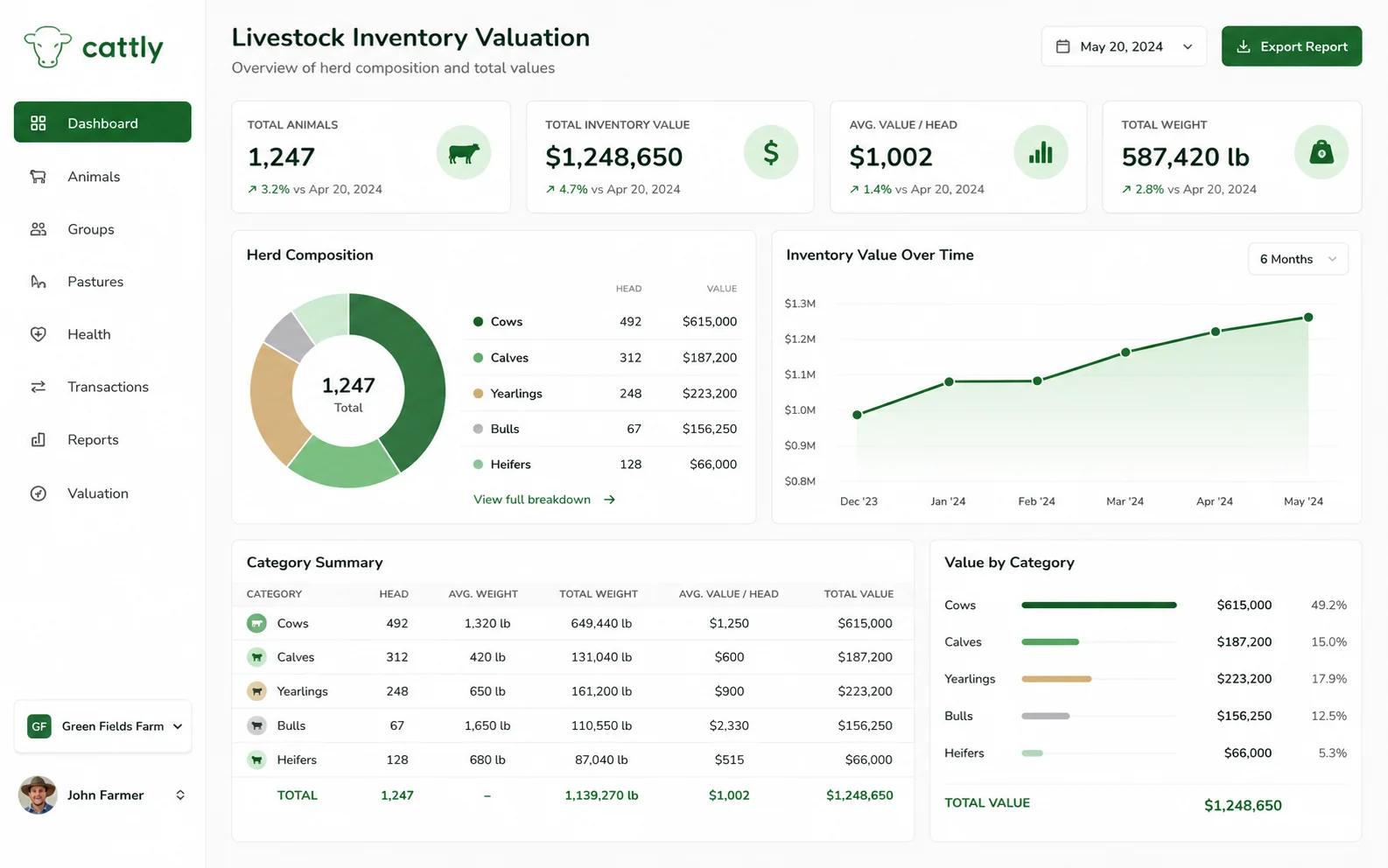
Live Inventory
Herd valuation by animal term with year-over-year comparison.
Animal Summary, Breeding, Weight Gain & Dairy Metrics
Beyond taxes and financials, you need operational intelligence to run the place day to day. How many animals do you have right now? What's the conception rate this breeding season? Which animals are gaining weight fastest? Four operational reports answer those questions with live data from your records.
Animal Summary
Total animal count broken down by term (cow, heifer, bull, steer, calf), gender, and status. Know your herd composition at a glance.
Breeding Stats
Total breedings, pregnancy confirmations, births, failures, and conception rate. Heat cycles detected. Average calving interval. Breakdown by breeding method.
Weight Gain & ADG
Per-animal weight tracking with Average Daily Gain. Top 10 gainers and bottom 10. Breakdown by breed and gender. See which genetics perform.
Dairy Production
Total milk production, average daily per animal, active lactations count, monthly trends. Top 10 producers by volume.
From Tax Setup to Financial Close: Your Complete Workflow
Four steps from configuration to filing. No spreadsheets, no manual data entry, no last-minute scrambles.
Tax Configuration
Set up your tax rates, categories, and fiscal year once. Choose your tax regime — Schedule F, cash basis, VAT, GST, or general business. Configure default sale and expense categories. The 4-step setup wizard walks you through everything. Takes about 10 minutes, and you're done until something changes.
Auto-Classification
From this point forward, every transaction you record gets auto-tagged. Animal sales, feed purchases, vet bills, equipment expenses — all classified into the right tax category based on your rules. Manual overrides available when you need them. Full audit trail on everything so you can trace any classification back to its source.
Run Reports
Generate Profit & Loss, expense breakdown, comparative reports, Schedule F worksheet, and tax liability reports — all from your live data. Filter by date range, period, or category. See year-over-year variances. Every report is a click away, and every number ties back to a real transaction in your records.
Export & File
Export any report to PDF or CSV with one click. Give the PDF to your accountant, import the CSV into your tax software, or file directly. Your entire year's financial data is organized, categorized, and ready for tax season by the time January rolls around.
Why Ranchers Ditch Spreadsheets for Cattly Tax & Reports
Farm taxes are complicated enough. Your software shouldn't make them worse. Here's what proper reporting does for your operation.
Tax-Ready Reports
Schedule F worksheet, Profit & Loss, expense breakdown — all the reports your CPA asks for, generated from your actual farm data. No re-creating everything in February. Hand your accountant a PDF and call it done.
No More Spreadsheets
Automated classification and reporting saves hours every month. No more manual categorization, no more copy-pasting between sheets, no more broken formulas discovered on April 14. The data flows in as you work, and the reports build themselves.
Audit-Ready Records
Every transaction is classified, time-stamped, and traceable. Full audit trail on all classification overrides. If the IRS asks questions, you have answers — complete with supporting data, not a shoebox of receipts and a prayer.
Make Better Decisions
See profitability per animal, per category, per period. Know which income streams are actually profitable. Spot expense creep before it becomes a problem. Real data beats gut feelings every time.
Farm Tax Software FAQ: Schedule F, Reports & Financial Management
Real answers from cattle producers who understand the challenges of managing farm taxes and financial reporting
Still have questions? We're here to help.
Stop Losing Records. Stop Guessing. Start Managing — Free.
No credit card required
Manage unlimited animals, feed, health records, and finances from a single dashboard. 100% free, no credit card required.